

Introduction
Getting Started
Learn how to integrate wolla.io with your smart contract and dapp.
1. Sign in to wolla.io
Click here to sign in or sign up to wolla.io.
2. Create a new allowlist
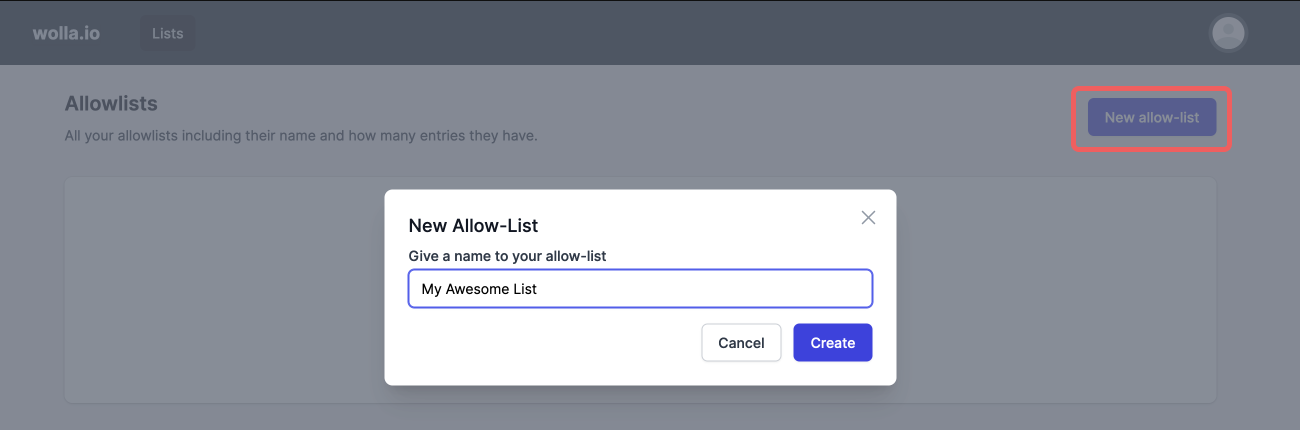
Open the dashboard on wolla.io/dash, click on New allowlist and give it a name.
3. Add addresses to your allowlist
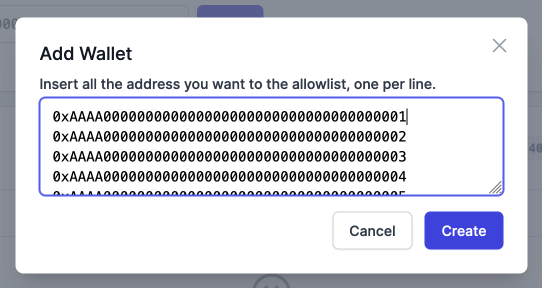
With the newly created allowlist open, click on Add addresses. You can add many addresses at once, one per line.
4. Integrate wolla.io with your smart contract
There are a few things you need to setup to integrate wolla.io with your smart contract. Check the example and the notes below.
// 1
import { ECDSA } from "@openzeppelin/contracts/utils/cryptography/ECDSA.sol";

contract MyContract {
    error InvalidSignature();

    // 2
    address internal immutable _signer;

    // 3
    constructor(address signer) {
        _signer = signer;
    }

    // 4
    function functionThatRequiresAllowlist(bytes calldata signature) payable external {
        // ...Do some checks...

        // 5
        bytes32 hash = keccak256(abi.encode(msg.sender, address(this)));

        // 6 - Check signer is valid
        if (_signer != ECDSA.recover(ECDSA.toEthSignedMessageHash(hash), signature)) {
            revert InvalidSignature();
        }

        // Do something...
    }
}
- Import code to verify signature on 5, here we use OpenZeppelin's ECDSA to retrieve the signer's address of a signature
- Store the address of the signer authority provided in the wolla ui
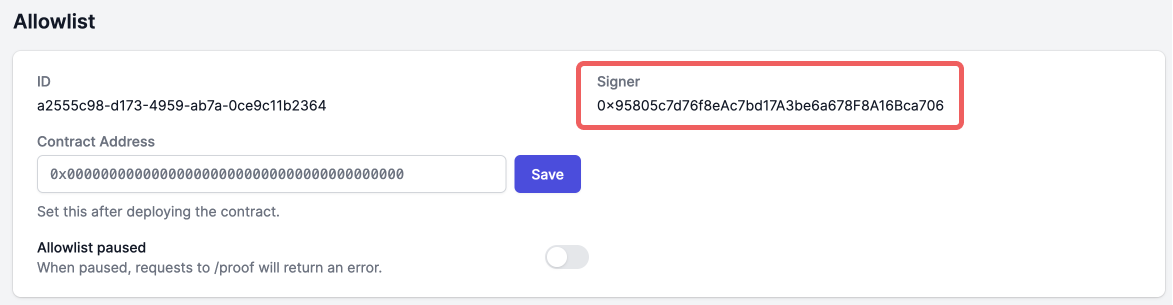
- For this contract, we initiate signer in the contract's constructor
- This is the function that can only be called by addresses in the allowlist, we need the
bytes signatureargument to verify that a wallet is really in the allowlist - We need to calculate the hash generated by wolla which is the keccak256 of the allowed address and the contract address, both with 32byte size, padded with zeros
- Then we verify if the signature provided by the caller was really signed by the signer authority on 2
5. Set contract address on wolla ui
For the wolla api to start working for your allowlist, you need to set the contract address. You will only have this value once your contract is deployed, so for testing purposes, you can set it to anything just to get the api working.

6. Integrate with your dapp
Once the contract address is set, we can make calls to the wolla api.
You'll need the allowlist id for that, which is found in the url of the allowlist:

The endpoint for the request is https://api.wolla.io/proof and you need to pass allowlistId and address as query parameters, check the example using curl:
curl https://api.wolla.io/proof?allowlistId=<YOUR-ALLOWLIST-ID>&address=<ADDRESS-TO-CHECK>
If successful, this will return a JSON in the following format:
{
  "signature": "..."
}
If it errors, the status code will still be 200, but the response body will be:
{
  "error": {
    "message": "..."
  }
}
After getting the hash and signature of the current user in your dapp, use those values to call the function in your contract, here is a simplified example of a function to call our api and another to call the contract function in javascript:
const allowlistId = '...'

const proofForAddress = async (address) => {
  // Note: you might want to handle errors here
  const response = await fetch(
    `https://api.wolla.io/proof?allowlistId=${allowlistId}&address=${address}`
  )
  const data = await response.json()
  return data.signature
}

const mint = async (signer, address) => {
  const signature = proofForAddress(address)
  const contract = new ethers.Contract('0x123...', [
    'function functionThatRequiresAllowlist(bytes calldata signature) payable external'
  ], signer)
  const tx = await contract.functionThatRequiresAllowlist(signature)
  // ...
}